Architecture
Streams are organized inside Stream Rooms. Think of a Stream Room as a secure module for real-time sessions in which authorized users can:
- join and leave the room,
- publish local audio, video, and desktop tracks,
- subscribe to selected remote streams,
- manage room metadata and membership.
Each Stream Room has its own set of permissions, defined by assigning users' public keys to the room. Only users with access to the room can read its encrypted metadata and take part in its real-time session.
The module's public API is centered around StreamApi, which lets you manage Stream Rooms, prepare local streams, publish tracks, subscribe to remote streams, and handle Stream events.
PrivMX Bridge and Media Server
Working with Streams requires additional Media Server infrastructure:
- Janus Gateway: broadcasts feeds between participants.
- coTURN: a TURN server used to relay traffic when a firewall or network configuration (e.g. double NAT) on the end-user or Media Server host would otherwise block a direct connection.
For step-by-step instructions on setting up PrivMX Bridge and Media Server, see the Quick Start installation guide.
Stream Module
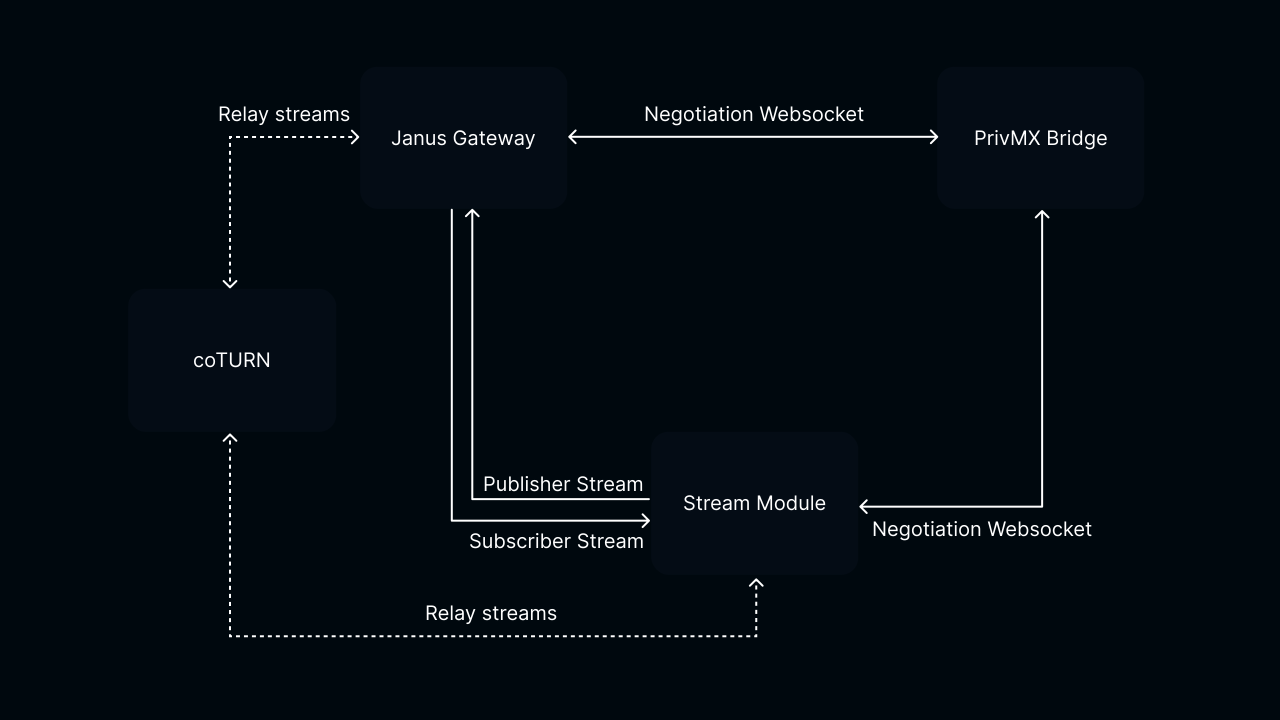
The Stream module is based on two WebRTC connections per room: a Publisher and a Subscriber, which aggregate outgoing and incoming feeds respectively. Each connection carries exactly one WebRTC stream, so in PrivMX a connection and a stream map one-to-one. A stream can carry feeds such as audio and video tracks or a data channel.
Lifecycle
Join Stream Room
When you call joinStreamRoom, PrivMX Bridge opens the Negotiation Websocket to the Janus Gateway
to exchange WebRTC offers/answers and to listen for streams changes events in the joined Room.
Create Stream
When you call publishStream/createSubscriberStream, PrivMX Endpoint starts the WebRTC negotiation process with Janus Gateway via PrivMX Bridge Negotiation Websocket.
After a successful negotiation (the offer/answer exchange), PrivMX Endpoint establishes a Publisher/Subscriber Stream with Janus and feeds start flowing over WebRTC.
If a direct connection cannot be established, WebRTC falls back to COTURN and creates a relayed Publisher/Subscriber Stream.
If that also fails, the two peers have no reachable route to each other.
Remove Stream
Calling removeStream/removeSubscriberStream initiates closing of the Publisher/Subscriber Stream.
Even with no active streams, you remain a participant in the Room and can keep listening for stream changes.
Leave Stream Room
When you call leaveStreamRoom, all active streams and the Negotiation Websocket between both Janus Gateway and PrivMX Bridge are closed.
We use cookies on our website. We use them to ensure proper functioning of the site and, if you agree, for purposes such as analytics, marketing, and targeting ads.