Threads
Thread Module is a structured communication tool used for message based communication.
Users create Threads to organize topic-specific conversations where they can securely exchange encrypted messages with designated participants. All the active users are notified right away when a new message arrives or anything within the Thread changes.
All the data is stored in PrivMX Bridge and can be freely shared between its users.
Prerequisites
Before working with Threads, you need to have a PrivMX Bridge instance.
To install it, follow our PrivMX quick start guide.
Architecture
Threads are time-sorted Modules for messages. Think of a Thread as a Module that allows you to post messages, which can include any binary or text data as well as metadata. Each Thread has its own set of permissions, managed by assigning the users’ public keys to the Thread. Only the users with assigned public keys can read the messages posted in that Thread. Decryption of these messages is possible only with the corresponding private keys.
Each message is protected by a synchronous key, which is further secured using an asynchronous pair of public and private user keys. This dual-layer encryption ensures that the system remains both safe and efficient.
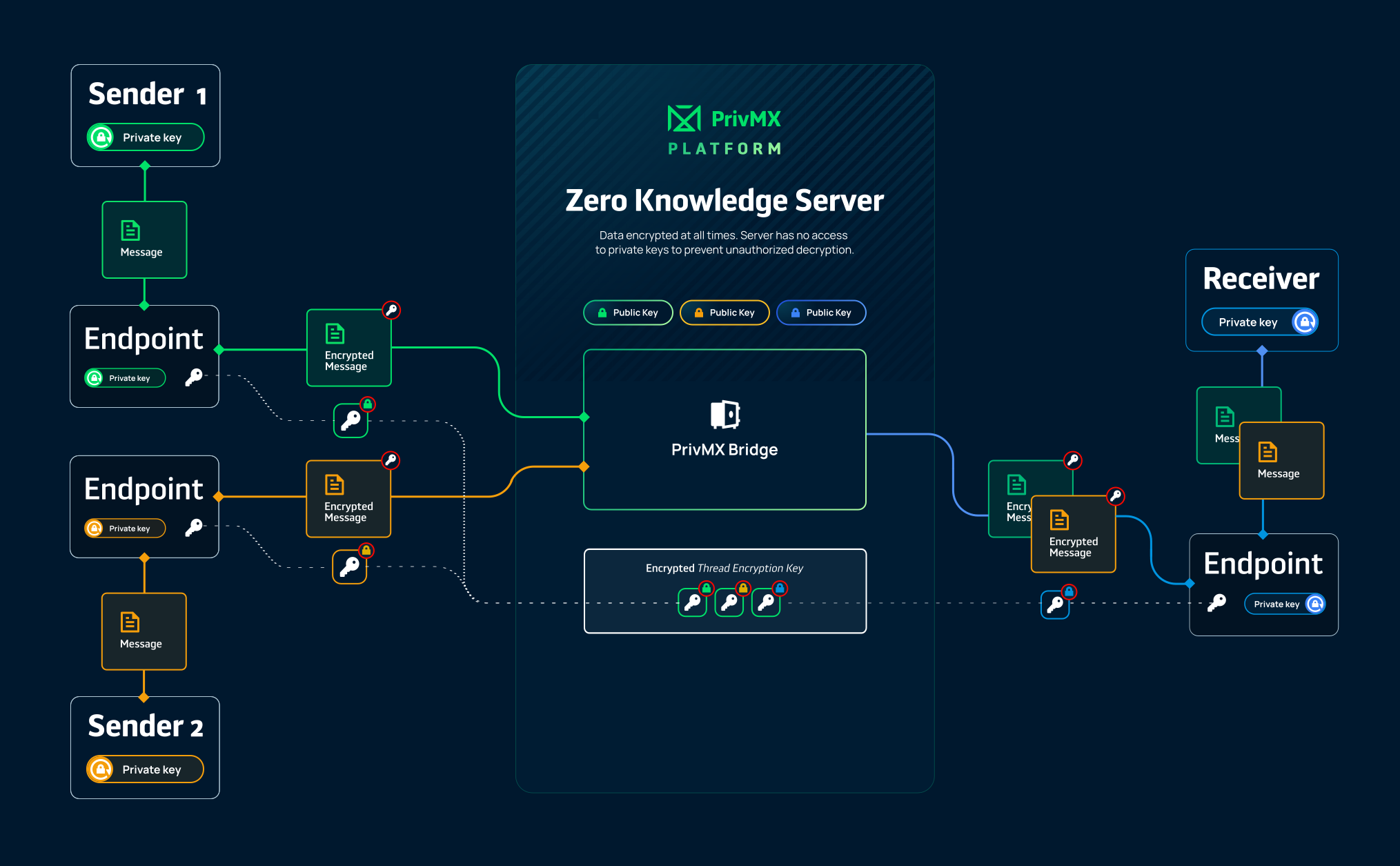
The following diagram is a visual reference for the architecture of Threads:
!
Messages in Threads
The main data units in Threads are messages, which contain binary data, as well as metadata
privateMeta- encrypted data about the messagepublicMeta- decrypted additional data about the message
Each message also has information assigned by PrivMX Bridge.
Encryption
Each message is protected by a synchronous key, which is further secured using an asynchronous pair of public and private user keys. This dual-layer encryption ensures that the system remains both safe and efficient.
Only an end user can create a Thread, by providing a set of public keys for the users who should have access to the Thread.
A symmetric key for the Thread (Thread Encryption Key) is then generated by the Thread author and securely stored on the server, encrypted using public keys of users assigned to the Thread. This ensures that only the authorized users have access to the Thread's Encryption Key. Unencrypted keys never leave User Endpoints.
When accessing a Thread, the encrypted Thread Encryption Key is sent to each user based on their assignment to the Thread. Only the users with proper Private Keys can decrypt Thread Encryption Key. Using the decrypted key, messages are encrypted and signed with the users’ Private Keys before being sent to the Bridge.
This process is handled by the PrivMX Endpoint and is completely seamless for the users.
Examples
-
Chatee A demo project of Chat Application, containing server-side logic and web client. Created with Next.js.
-
Simple, minimal examples A set of short code snippets showing you how to start interacting with PrivMX Endpoint Library.
Using Threads
Learn how to work with Threads in your chosen language:
We use cookies on our website. We use them to ensure proper functioning of the site and, if you agree, for purposes such as analytics, marketing, and targeting ads.